imagePROGRAF PRO-6000S series (PDF) User Manual (Windows)
Manuals
Brands
Canon Manuals
large format printers
imagePROGRAF PRO-6000S
681
682
683
684
685
686
687
688
689
690
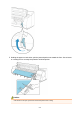
5.
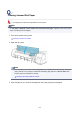
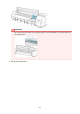
Holding the paper on both sides, pull the jammed portion out toward the front. Use scissors
or a cutting tool to cut away the printed or wrinkled portion.
Caution
•
Be careful not to injure yourself or scratch the printer when cutting.
690
1
...
...
688
689
690
691
692
...
...
953