
imagePROGRAF PRO-6000S series (PDF) User Manual (Windows)





Preparing to Transfer the Printer
To protect the internal parts in transit, always follow these steps before transferring the printer to a new
location.
For details on packing the printer and installing it after transfer, see "Reinstalling the Printer."
Important
• Be sure to contact your Canon dealer before transferring the printer to a new location. Ink may leak and
damage the printer if you do not prepare the printer correctly and it is tipped or stood on end in transit.
Note
• The maintenance cartridges needs to be replaced when you execute the Prepare to transportation
menu. Prepare the maintenance cartridge in advance while referring to the table below. The number of
maintenance cartridge required varies depending on the amount remaining in the maintenance
cartridge being used.
• If you can move the printer in a level state using casters or something similar, you do not need to
execute Prepare to transportation.
• Always follow the instructions of the service representative when preparing to transfer the printer.
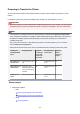
Prepare to
transportation
Menu
Usage Examples Transport
and Storage
In Low Tem-
perature En-
vironments
Permitted Angle
of Inclination
Required
Mainte-
nance Car-
tridges
Move indoors on
the same floor
Move indoors by carry-
ing
No All directions: with-
in 30°
1-3
Move indoors to a
different floor
Moving the printer
while temporarily tilting
it such as when using
the stairs
No All directions: with-
in 90°
1-3
Transport out-
doors
Transport By Vehicle Yes All directions: with-
in 90°
3
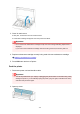
Remove paper
1. Remove the paper.
•
Rolls
Removing the Upper Roll from the Printer
Removing the Lower Roll from the Roll Unit
•
Sheet
Removing Sheets
388