
imagePROGRAF PRO-6000S series (PDF) User Manual (Windows)



Note
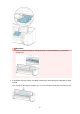
• Dispose of the used print head in accordance with local regulations.
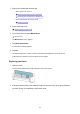
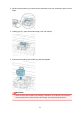
7. Remove print head that was in case from pouch.
8.
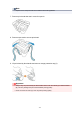
Remove tape used to secure print head.
9.
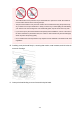
Lift print head by blue handle and remove orange protective cap (2).
Important
•
Always carry the print head by the blue handle. Never touch the nozzle (A) or metal contacts
(B). This may damage the print head and affect printing quality.
•
Never touch the ink holes (C). This may affect printing quality.
359