
imagePROGRAF PRO-6000S series (PDF) User Manual (Mac)



Important
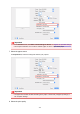
• In the Presets section, click Save Current Settings as Preset... to register the specified settings.
• See "Paper Information List" for Canon authentic paper or Canon output check paper.
7.
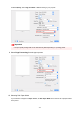
Select the paper source
For Paper Source, select the setting that matches your purpose.
Important
•
The paper feed method will differ according to the paper or lower level (roll paper 2) settings, or
roll unit option settings.
8. Select the print quality
409