
Guide for Free Layout (Windows)

Center Vertically
Lays out the objects, justifying them to the vertical center.
You can also set it with Center Vertically in the Object menu.
Align Bottom
Lays out the objects, justifying them to the bottom.
You can also set it with Align Bottom in the Object menu.
Align Left
Lays out the objects, justifying them to the left.
You can also set it with Align Left in the Object menu.
Center Horizontally
Lays out the objects, justifying them to the horizontal center.
You can also set it with Center Horizontally in the Object menu.
Align Right
Lays out the objects, justifying them to the right.
You can also set it with Align Right in the Object menu.
Help
Displays the Free Layout guide.
You can also display this from the Help menu.
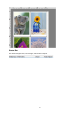
Layout Area
This allows you to lay out objects and edit the object size and orientation.
22