
Guide for Free Layout (Mac)

Rotate Left
Rotates the selected object 90 degrees counterclockwise.
You can also set this with Rotate Left in the Object menu.
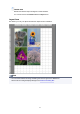
Layout Area
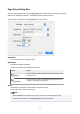
This allows you to lay out objects and edit the object size and orientation.
Note
• You can switch between showing and hiding the ruler and grid on the View menu.
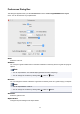
Set the ruler unit and grid display settings in the Preferences Dialog Box.
23