
Guide for Free Layout (Mac)
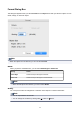

Enlarge
Enlarges an object.
You can also set this with Enlarge in the View menu.
Reduce
Reduces an object.
You can also set this with Reduce in the View menu.
Zoom
Displays the object with the specified scaling.
You can also set this with the Zoom dialog box.
Undo
Cancels the last edit.
You can also execute this with Undo in the Edit menu.
Redo
Restores the edit reversed with Undo.
You can also execute this with Redo from the Edit menu.
Cut
Cuts the selected object.
You can also execute this with Cut from the Edit menu.
Copy
Copies the selected object.
You can also execute this with Copy from the Edit menu.
Paste
Pastes the cut or copied object.
You can also execute this with Paste from the Edit menu.
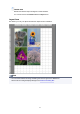
Auto Arrange
Automatically lays out the objects in the selected window.
You can also set this with Auto Arrange Object in the Object menu.
Help
Displays the Free Layout guide.
You can also display this from the Help menu.
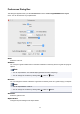
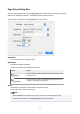
The Customize Toolbar panel appears when you select Customize Toolbar in the View menu. You can
change the tool buttons that appear.
21