
Guide for Accounting Manager (Windows)
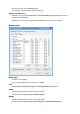
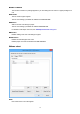

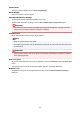

Copy Unit Cost Dialog Box
Specifies the printer and items, and copies the unit cost settings.
Copy From
From the list of registered printers (same printers as displayed in the printer list on the main screen),
select the printer to copy from.
Copy To
Select the printer to copy to.
Category
Select the items to be copied.
You can select Ink, Paper, and Others individually.
Note
• If you copy unit costs, all the unit cost settings on the printer copied to will be overwritten with the unit
cost settings on the printer copied from.
75