
Guide for Accounting Manager (Mac)
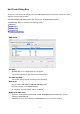



Paper sheet
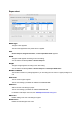
Media Type
The paper name appears.
The name that appeared in the printer driver is applied.
Size
General Purpose, Regular Size Name, or Roll Paper Width Name appears.
Width
The paper width appears according to the units setting.
You can edit the list directly if Size is General Purpose.
Height
The paper length appears according to the units setting.
You can edit the list directly if Size is General Purpose or Roll Paper Width Name.
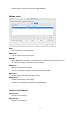
Number of Sheets
The number of sheets in a package appears if you are setting the unit costs for a paper package as a
unit.
Unit Costs
The unit costs for paper appear.
The unit cost settings you added are added to the Unit Cost List.
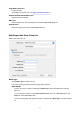
Add button
Adds a new unit cost setting for paper.
The unit cost settings you added are added to Unit Cost List.
For details on Add Paper Unit Cost, see "Add Paper Unit Cost Dialog Box."
Edit button
Enables editing of the unit cost settings for paper.
Delete button
Deletes the selected paper unit costs.
72