
imageCLASS MF7280 Reference Guide



Additional Functions Settings Table
3-8
3
Customizing Settings
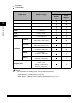
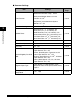
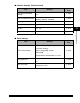
■ Adjustment/Cleaning
*1 Indicates the default setting.
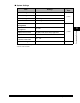
■ Report Settings
*1 Indicates the default setting.
*2 See the Facsimile Guide.
*3 See the Sending Guide.
Item Settings
Applicable
Page
Transfer Roller Cleaning Press [Start] p. 6-30
Fixing Unit Cleaning Press [Cleaning Sheet Print] p. 6-32
Feeder Cleaning Press [Start] p. 6-37
Special Mode M
Normal
*1
, Low, High
p. 3-57
Special Mode N
On, Off
*1
p. 3-59
Special Mode O
Stack Bypass: On, Off
*1
Drawer: On, Off
*1
p. 3-60
Special Mode P
On, Off
*1
p. 3-62
Bond Special Fixing Mode
On, Off
*1
p. 3-64
Special Mode S
Speed Priority 1, Speed Priority 2, Off
*1
p. 3-65
Auto Adjustment for Dirty
Feeder
On
*1
, Off
p. 3-67
Maintenance Code This setting is not functional in this model. -
Item Settings
Applicable
Page
Settings
TX Report: On, For Error Only
*1
, Off
*2, *3
Report With TX Image: On
*1
, Off
Activity Report
Auto Print: On*
1
, Off
Send/Receive Separate: On, Off*
1
RX Report: On, For Error Only, Off*
1
Print List Address Book List
One-touch Buttons: Yes, No
Address Book: Yes, No
User's Data List: Yes, No