
imageCLASS MF7280 Reference Guide
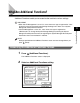



Additional Functions Settings Table
3-6
3
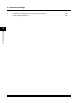
Customizing Settings
■ Common Settings
*1 Indicates the default setting.
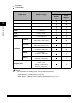
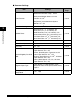
Item Settings
Applicable
Page
Initial Function
Select Initial Function: Copy
*1
, Send
Set System Monitor Screen as initial
function: On, Off
*1
Set [Device] as the default for System
Monitor: On
*1
, Off
p. 3-15
Auto Clear Setting
Initial Function
*1
, Selected Function
p. 3-18
Audible Tones
Entry Tone: On
*1
(1
*1
to 3 levels), Off
Error Tone: On
*1
(1
*1
to 3 levels), Off
Send Done Tone: On (1 to 3 levels), Off
*1
Receive Done Tone: On (1 to 3 levels), Off
*1
Print Done Tone: On
*1
(1
*1
to 3 levels), Off
Scan Done Tone: On
*1
(1
*1
to 3 levels), Off
p. 3-20
Toner Save Mode
High, Low, Off
*1
p. 3-22
Printer Density
1 to 9 levels; 5
*1
p. 3-23
Inch Entry
On
*1
, Off
p. 3-24
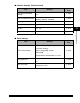
Drawer Eligibility For APS/
ADS
Copy: (Stack Bypass: On, Off
*1
, All Other
Paper Sources: On
*1
, Off)
Printer: (Stack Bypass: cannot be set, All
Other Paper Sources: On
*1
, Off)
Receive: (Stack Bypass: On, Off
*1
, All Other
Paper Sources: On
*1
, Off)
Other: (Stack Bypass: On, Off
*1
, All Other
Paper Sources: On
*1
, Off)
p. 3-26
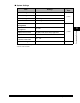
Register Paper Type
Paper Drawer 1, Paper Drawer 2: Plain
*1
,
Recycled, Color, 3-hole punch, Bond, Heavy
Paper 1
p. 3-29
Energy Consumption in
Sleep Mode
Low
*1
, High
p. 3-32