
imageCLASS MF7280 Reference Guide





Making Prints Using the Stack Bypass
2-32
2
Basic Operations
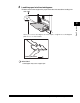
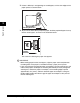
❑ If there is difficulty in straightening out curled paper, curl the front edges of the
paper upward, as shown below.
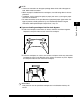
❑ To print on the back side of preprinted paper, load the preprinted paper face up
into the stack bypass, as shown in the illustration below.
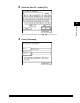
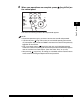
The screen for selecting the paper size appears.
IMPORTANT
•
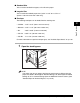
When loading paper into the stack bypass, align the paper stack neatly between
the slide guides. If the paper is not loaded correctly, a paper jam may occur.
•
If you are printing on heavyweight paper or envelopes using the stack bypass, and
find that the paper or envelopes are not being fed smoothly or evenly through the
stack bypass, remove the paper or envelopes, curl the feeding edges upward
approximately 1/8" (3 mm), and then reload the paper or envelopes. Curling the
feeding edges enables the rollers to grip the paper or envelopes as they are fed
into the stack bypass.
Feeding Direction
Feeding
Direction