
imageCLASS MF7280 Reference Guide





Using the User ID Management
2-26
2
Basic Operations
4
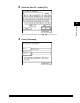
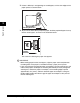
Enter the password ➞ press [OK].
You can also enter the password using - (numeric keys).
5
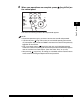
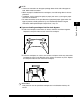
Press (Log In/Out).
The Basic Features screen of the selected function appears on the touch panel
display.
If the User ID or password that you entered is incorrect, a message appears
prompting you to verify your User ID and password. Repeat this procedure from
step 1.