
imageCLASS MF7280 Reference Guide


Entering the Department ID and Password
2-23
2
Basic Operations
3
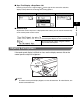
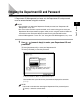
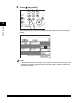
When your operations are complete, press (Log In/Out) on
the control panel.
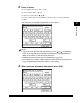
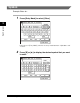
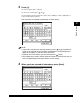
The screen for entering the Department ID and password appears.
NOTE
•
To perform operations again, you have to re-enter your Department ID and
password.
•
If you do not press (Log In/Out) after you are finished operating the machine,
any subsequent copies made are added to the total of the Department ID you
previously entered.
•
Even if you forget to press (Log In/Out) after you are finished operating the
machine, the screen for entering the Department ID and password automatically
appears after the set Auto Clear Time elapses. (See "Auto Clear Time," on p. 3-54.)
•
After pressing (Log In/Out), all settings are canceled, and the machine returns
to the screen for entering the Department ID and password.
789
0
Error Power
PQRS TUV WXYZ
Additional
Functions
Display
Contrast
Processing/
Data
Log In/Out Clear
Start
Stop