
imageCLASS MF7280 Reference Guide


Entering Characters from the Touch Panel Display
2-19
2
Basic Operations
3
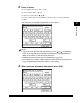
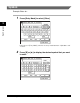
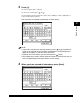
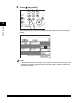
Press [é].
To enter a space, press [Space].
To move the cursor, press [ ] or [ ].
To enter alphanumeric characters, press [Entry Mode] to select [Alphabet] ➞
enter the desired characters.
The characters you entered are displayed, as shown below.
NOTE
•
If you make a mistake when entering characters, press [ ] or [ ] to position the
cursor on the right side of the characters to be deleted
➞
press [Backspace] to
delete the characters
➞
enter the correct characters.
•
To delete all of the characters you have entered, press (Clear).
•
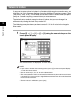
The available entry modes, and the maximum number of characters that you can
enter vary, depending on the type of entries you are making.
4
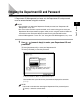
When you have entered all characters, press [Next].