
imageCLASS MF7280 Reference Guide






Overview of the imageCLASS MF7280
2-12
2
Basic Operations
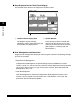
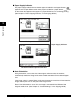
■ Paper Supply Indicator
The paper supply indicator shows whether paper is loaded in each paper drawer.
appears on the Paper Select screen when paper is loaded in a paper drawer. blinks
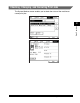
on the screen that appears when paper in a paper drawer has run out during printing.
(See Chapter 2, "Basic Copying Features," in the Copying Guide.)
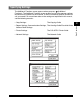
■ Auto Orientation
Using information, such as the size of the original and zoom ratio, the machine
automatically rotates the image to the most suitable orientation for the selected paper
size.
If the image, after it is rotated, does not fit onto the paper, the machine will not rotate the
image, and will print it as is, with part of the image cut off.
Even if Auto Orientation is set to 'On', the image is not rotated if the Different Size
Originals mode is set. (See Chapter 4, "Custom Settings," in the Copying Guide.)
The Paper Select Screen
Paper Supply Indicator
The Screen When Paper Has Run Out