
imageCLASS MF7280 Reference Guide






Overview of the imageCLASS MF7280
2-10
2
Basic Operations
NOTE
•
For instructions on checking the status of Copy and Send/Fax jobs, see Chapter 4,
"Checking Job and Device Status," in this manual, Chapter 6, "Checking/Changing the
Send/Receive Status," in the Sending Guide, and Chapter 3, "Checking/Changing the
Fax Status," in the Facsimile Guide.
•
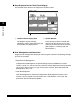
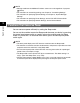
The meanings of the icons that appear in the Job/Print Status Display Area (on the
bottom left of the screen) indicate a certain status of each job. The meanings of the icons
are described as shown below:
Icon (Type of Job) Description
Copy Job
Send Job
Fax Job
Printer Job
Report Job
Additional Functions Job
Icon (Machine Status) Description
Error
Paper Jam
Replace Cartridge