
imageCLASS MF7280 Reference Guide






Overview of the imageCLASS MF7280
2-6
2
Basic Operations
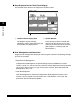
■ Keys Displayed on the Touch Panel Display
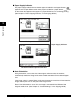
The example shown below is the Copy Basic Features screen.
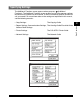
■ User Management and Restriction
A login service manages data relating to users using the machine. The following two login
services are available:
a Job/Print Status Display Area b System Monitor
The progress of jobs and copy
operations, and the status of devices and
consumables are displayed here.
Press this key to check or cancel jobs,
and to check the job log. You can also
check the current status of the machine.
(See Chapter 4, "Checking Job and
Device Status.")
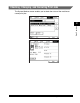
• Department ID Management
If Department ID Management in System Settings (from the Additional Functions
screen) is set to 'On', only the users who enter the correct Department ID and password
(up to seven digits for each) can gain access to the machine. (See "Department ID
Management," on p. 5-6.)
• User ID Management
User ID Management is linked to the Department ID Management function of this
machine. You can register user information from a web browser, such as IDs and
passwords. (See the Remote UI Guide.)
ab