
imageCLASS MF7280 Reference Guide



Main Power and Control Panel Power
1-19
1
Before You Start Using This Machine
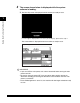
● If the message <Enter the User ID and Password.> appears:
❑
Press [User ID] ➞ enter the User ID ➞ press [OK].
❑ Press [Password] ➞ enter the password ➞ press [OK].
❑ Press (Log In/Out).
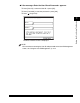
The Basic Features screen is displayed.
NOTE
For instructions on entering the User ID and password on the User ID Management
screen, see "Using the User ID Management," p. 2-24.