
imageCLASS MF7280 Reference Guide



Main Power and Control Panel Power
1-17
1
Before You Start Using This Machine
NOTE
•
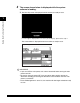
Once the message <Ready to copy.> appears on the touch panel display, you can
specify settings. Copying or printing begins automatically, as soon as the machine
finishes warming up. (See Chapter 1, "Introduction to Copying," in the Copying
Guide.)
•
In the case above, the default settings are selected.
•
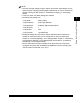
The default copy settings are:
•
The default settings for each function (Copy or Send/Fax) of the machine are
already set at the factory, but you can change them to suit your needs. (See
Chapter 4, "Customizing Settings," in the Copying Guide, Chapter 7, "Customizing
Communications Settings," in the Sending Guide, and Chapter 4, "Customizing
Fax Settings," in the Facsimile Guide.)
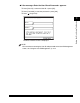
•
You can select which functions to display on the Basic Features screen when
turning the main power ON, according to the Additional Functions settings. (See
"Initial Function at Power ON," on p. 3-15.)
- Copy Ratio: Direct (100%)
- Paper Selection: Auto Paper Selection
- Copy Exposure: Automatic Exposure Adjustment
- Copy Quantity: 1
- Copy Quality: Text
- Copy Function: 1 1-sided copy