
imageCLASS MF7280 Reference Guide


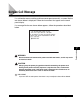


Service Call Message
7-32
7
Troubleshooting
1
Turn the main power switch OFF. Allow at least 10 seconds
before turning the main power switch back ON.
2
If the machine still does not operate normally, follow the
procedure below, and then contact Canon Authorized Service
Facilities or the Canon Customer Care Center.
❑ Turn OFF the main power.
❑ Disconnect the power cord from the wall outlet.
NOTE
When contacting Canon Authorized Service Facilities or the Canon Customer Care
Center, check the following:
- Model name
- Problems and status of the machine
- Error code on the touch panel display