
imageCLASS MF7280 Reference Guide





Routine Cleaning
6-38
6
Routine Maintenance
2
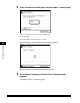
Place 10 sheets of blank paper into the feeder ➞ press [Start].
Make sure that you fan the sheets of paper well.
Use LTR paper.
To cancel feeder cleaning, press [Cancel].
While the feeder is being cleaned, the screen below appears.
The display returns to the Adjustment/Cleaning screen.
3
Press [Done] repeatedly until the Basic Features screen
appears.
The feeder is clean. Try scanning again.