imageCLASS MF7280 Reference Guide
Manuals
Brands
Canon Manuals
Copier
imageCLASS MF7280
241
242
243
244
245
246
247
248
249
250
Routine Cleaning
6-33
6
Routine Maintenance
2
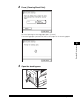
Press [Cleaning Sheet Print].
T
o cancel pri
nting the cleaning paper
, press [Cancel].
The cleaning paper is printed. Y
ou will use this paper as the cleaning paper
.
3
Open the stac
k b
ypass.
1
...
...
245
246
247
248
249
...
...
301