
imageCLASS MF7280 Reference Guide





Replacing the Cartridge
6-15
6
Routine Maintenance
IMPORTANT
•
Use only cartridge recommended for use on this machine.
•
Do not replace cartridge until the message prompting you to do so appears.
•
Do not attempt to replace the cartridge while the machine is printing.
NOTE
•
Complete instructions on how to replace the cartridge can be accessed by pressing
[Previous] or [Next] on the touch panel display.
•
If the toner runs out during a print job, the machine will start printing the remaining pages
automatically after you replace the cartridge.
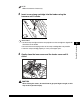
1
Press the button on the left cover of the main unit, and open
the left cover.
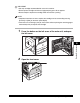
2
Open the front cover.