
imageCLASS MF7280 Reference Guide





Feeder
6-13
6
Routine Maintenance
NOTE
Widen the tweezers if necessary.
3
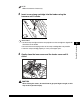
Insert a new stamp cartridge into the feeder using the
tweezers until it clicks.
IMPORTANT
•
Set the stamp cartridge so that the two projections on the cartridge are aligned with
the hollows on the feeder.
•
Be careful that the stamping surface of the stamp cartridge does not protrude.
•
Insert the stamp cartridge properly, or it may cause paper jams.
4
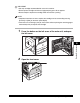
Gently close the inner cover and the feeder cover until it
clicks.
CAUTION
When closing the covers, be careful not to get your fingers caught, as this
may result in personal injury.