
imageCLASS MF7280 Reference Guide





Paper Drawers
6-10
6
Routine Maintenance
7
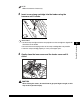
Set the paper-size detecting lever, located on the left side of
the paper drawer, to match the size of the paper being loaded.
IMPORTANT
Be sure to set the paper-size detecting lever correctly. If the lever is positioned
incorrectly to the size of paper loaded in the paper drawer, the wrong paper type
will be shown on the touch panel display. This may also cause paper jams, dirty
prints, or make the inside of the machine dirty.
8
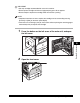
Stick the appropriate paper size label on the paper size plate.
A3 A4
A4 A5 B5 LGL LT R STMT U2
B4 B5 11X17 LT R U1 U3