
imageCLASS MF7280 Reference Guide





Paper Drawers
6-9
6
Routine Maintenance
5
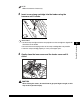
Lower the lock lever to the left to lock the side guide.
IMPORTANT
Be sure to set the lock lever correctly. If the lock lever is positioned incorrectly to the
type of paper loaded in the paper drawer, the wrong paper type will be shown on
the touch panel display. This may also cause paper jams, dirty prints, or make the
inside of the machine dirty.
6
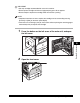
Load the appropriate size of paper into the paper drawer.
CAUTION
When loading paper, take care not to cut your hands on the edges of the
paper.