
imageCLASS MF7280 Reference Guide




Device Information Settings
5-29
5
System Manager Settings
2
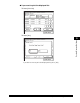
Enter the name and location of the machine.
❑ Press [Device Name] ➞ enter the name of the machine ➞ press [OK].
❑ Press [Location] ➞ enter the place where the machine is located ➞
press [OK].
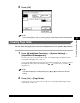
❑ Press [OK].
The maximum number of characters that can be entered is 32.
If you do not want to store the name and location of the machine, press
[Cancel].
The device name and the location of the machine are set.
NOTE
For instructions on entering characters, see "Entering Characters from the Touch
Panel Display," on p. 2-16.
3
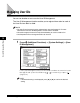
Press [Done] repeatedly until the Basic Features screen
appears.