
imageCLASS MF7280 Reference Guide




Department ID Management
5-26
5
System Manager Settings
6
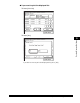
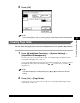
Press [OK].
NOTE
If you selected [On] in step 2, pressing [OK] activates Department ID Management.
Accepting Print Jobs with Unknown IDs
You can specify whether to accept or reject print jobs from computers that do not
correspond to any registered Department ID.
NOTE
The default settings is 'On''.
1
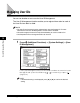
Press (Additional Functions) ➞ [System Settings] ➞
[Department ID Management].
If necessary, see the screen shot in step 1 of "Registering the Department ID,
Password, and Page Limit," on p. 5-7.
If the System Manager ID and System Password have been set, enter the System
Manager ID and System Password using - (numeric keys) ➞ press
(Log In/Out).
NOTE
If the desired setting is not displayed, press [
▼
] or [
▲
] to scroll to the desired
setting.