Department ID Management
5-24
5
System Manager Settings
3
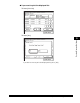
Press [Clear All Totals].
To clear one page total at a time by Department ID, press [▼] or [▲] to display
the desired Department ID ➞ select the Department ID ➞ press [Clear].
4
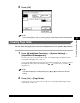
Press [Yes].
If you do not want to clear the page totals, press [No].