
imageCLASS MF7280 Reference Guide





Department ID Management
5-20
5
System Manager Settings
2
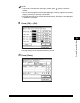
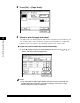
Press [On] ➞ [Page Totals].
3
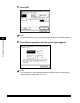
Check or print the page total count.
The page totals that belong to print jobs without a Department ID (left blank) are
the number of prints from computers that do not correspond with a registered
Department ID. These prints are referred to as prints with unknown IDs.
● If you only want to check the counter information:
❑
Press [▼] or [▲] to display the desired Department ID ➞ press [ ] or [ ] to
display and view the desired page totals.
NOTE
Press and hold down [
▼
] or [
▲
] to quickly and continuously scroll through the
available Department ID pages. Continuous scrolling is useful when a large
number of Department IDs are registered.