
imageCLASS MF7280 Reference Guide





Department ID Management
5-17
5
System Manager Settings
Erasing the Department ID and Password
You can erase the Department ID and password that you have registered.
1
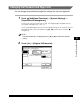
Press (Additional Functions) ➞ [System Settings] ➞
[Department ID Management].
If necessary, see the screen shot in step 1 of "Registering the Department ID,
Password, and Page Limit," on p. 5-7.
If the System Manager ID and System Password have been set, enter the System
Manager ID and System Password using - (numeric keys) ➞ press
(Log In/Out).
NOTE
If the desired setting is not displayed, press [
▼
] or [
▲
] to scroll to the desired
setting.
2
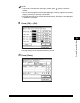
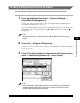
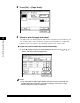
Press [On] ➞ [Register ID/Password].
If necessary, see the screen shot in step 2 of "Changing the Password and Page
Limit," on p. 5-13.
3
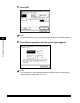
Press [▼] or [▲] to display the Department ID that you want to
erase ➞ select the Department ID ➞ press [Erase].
NOTE
Press and hold down [
▼
] or [
▲
] to quickly and continuously scroll through the
available Department ID pages. Continuous scrolling is useful when a large
number of Department IDs are registered.