
imageCLASS MF7280 Reference Guide





Department ID Management
5-15
5
System Manager Settings
NOTE
•
If you make a mistake when entering the password, press (Clear) to clear the
password.
•
You cannot change the Department ID.
5
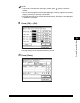
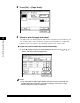
If you want to change or set a page limit restriction, press
[Turn Limits On/Off and Set Page Limits].
6
Change the page limit restriction if necessary.
❑ Press [On] under the desired function(s).
❑ Press [ ] (Page Limit) next to [On]/[Off] of the desired function(s) ➞ enter the
page limit restriction using - (numeric keys).
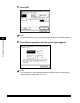
❑ Press [OK] ➞ [OK].
If you do not want to set a page limit restriction for a function, press [Off] under
the desired function's name.
The page limit(s) for the selected function(s) are set.