
imageCLASS MF7280 Reference Guide





Department ID Management
5-9
5
System Manager Settings
5
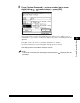
Use - (numeric keys) to enter the Department ID and
password.
❑ Press [Department ID] ➞ enter the Department ID.
❑ Press [Password] ➞ enter the password.
You cannot register a Department ID or password with only zeros as the
number, such as <0000000>. If you enter a number that begins with zeros, the
leading zeros are ignored.
Example: If <02> or <002> is entered, <0000002> is stored.
NOTE
•
If you make a mistake when entering a number, press (Clear) to clear the entire
number.
•
If you do not want to set a password, you can use the machine by entering only the
Department ID.
6
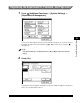
If you want to set a page limit restriction, press [Turn Limits
On/Off and Set Page Limits].