
imageCLASS MF7280 Reference Guide





Specifying the System Manager Settings
5-5
5
System Manager Settings
5
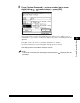
Press [System Password] ➞ enter a number (up to seven
digits) using - (numeric keys) ➞ press [OK].
You cannot store a System Password with only zeros as the number, such as
<0000000>. If you enter a number that begins with zeros, the leading zeros are
ignored.
Example: If <02> or <002> is entered, <0000002> is stored.
To cancel storing the System Manager Settings, press [Cancel].
The display returns to the Basic Features screen.
NOTE
If you make a mistake when entering the password, press (Clear) to clear the
password.