
imageCLASS MF7280 Reference Guide





Specifying the System Manager Settings
5-3
5
System Manager Settings
1
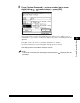
Press (Additional Functions) ➞ [System Settings].
If the System Manager ID and System Password have been set, enter the System
Manager ID and System Password using - (numeric keys) ➞ press
(Log In/Out).
2
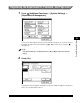
Press [System Manager Settings].
NOTE
If the desired setting is not displayed, press [
▼
] or [
▲
] to scroll to the desired
setting.