
imageCLASS MF7280 Reference Guide




Cleaning and Adjusting the Machine
3-67
3
Customizing Settings
Feeder Smudge Adjustment
If the feeder is dirty, copies may include unwarranted dots or lines. When this
function is set to 'On', dust, dirt or foreign objects in the feeder will not be printed.
IMPORTANT
If either [JPEG] or [PDF (Compact)] is selected for [File Format] when the Send function
is used, the setting for this mode is not applied.
NOTE
•
While some dots or lines may continue to be printed when this function is set to 'On',
copies are significantly clearer than when it is set to 'Off'.
•
The default setting is 'On'.
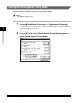
1
Press (Additional Functions) ➞ [Adjustment/Cleaning].
If necessary, see the screen shot in step 1 of "Improving Print Quality and Density
(Special Mode M)," on p. 3-57.
2
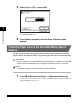
Press [▼] or [▲] until [Auto Adjustment for Dirty Feeder]
appears ➞ press [Auto Adjustment for Dirty Feeder].