
imageCLASS MF7280 Reference Guide




Cleaning and Adjusting the Machine
3-60
3
Customizing Settings
3
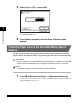
Select [On] or [Off] ➞ press [OK].
The selected mode is set.
4
Press [Done] repeatedly until the Basic Features screen
appears.
Preventing Paper Jams in the Two-Sided Mode (Special
Mode O)
A paper jam may occur when printing the backside of paper using the two-sided
paper function. Use Special Mode O to prevent paper jams with two-sided printing.
IMPORTANT
Do not use paper that has been exposed to high temperature or humidity for an extended
period of time. Two-sided printing on such paper will frequently result in a paper jam.
NOTE
The default settings are 'Off' for both Drawer and Stack Bypass.
1
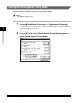
Press (Additional Functions) ➞ [Adjustment/Cleaning].
If necessary, see the screen shot in step 1 of "Improving Print Quality and Density
(Special Mode M)," on p. 3-57.