
imageCLASS MF7280 Reference Guide






Cleaning and Adjusting the Machine
3-58
3
Customizing Settings
3
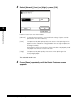
Select [Normal], [Low], or [High]➞ press [OK].
Details of each item are shown below:
The selected mode is set.
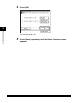
4
Press [Done] repeatedly until the Basic Features screen
appears.
[Normal]: In normal circumstances, use the default setting. Outputs can be
printed with the normal density.
[Low]: Compensate for poor print quality that occurs when printing on the
paper that was stored for a long period of time at high temperature
and high humidity.
Also effective when the machine's fixing unit does not properly feed
the paper that contains a lot of moisture.
[High]: Compensate for poor quality that occurs when printing on the
heavyweight paper.