
imageCLASS MF7280 Reference Guide






Timer Settings
3-55
3
Customizing Settings
2
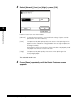
Press [-] or [+] to specify the desired Auto Clear Time ➞
press [OK].
The Auto Clear Time can be set from 0 to 9 minutes (in one minute increments).
You can also enter values using - (numeric keys).
The selected mode is set.
3
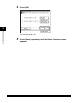
Press [Done] repeatedly until the Basic Features screen
appears.