
imageCLASS MF7280 Reference Guide






Timer Settings
3-51
3
Customizing Settings
❑ Select the month and day from the Month and Day drop-down lists,
respectively.
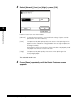
❑ Press [End Date] ➞ select the month and day for which Daylight Saving Time
ends ➞ press [OK].
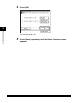
❑ Press [OK].
NOTE
•
If you set Daylight Saving Time, the machine automatically sets the standard time
of the machine one hour forward at the specified date and time.
•
The default setting is 'Off'.