
imageCLASS MF7280 Reference Guide






Timer Settings
3-50
3
Customizing Settings
● If you are setting the Time Zone:
❑
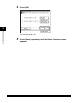
Press [Time Zone Settings] ➞ select the time zone in which the machine is
located ➞ press [OK].
NOTE
•
The default setting is 'GMT-3:00'.
•
If the desired time zone is not displayed, press [
▼
] or [
▲
] to scroll through the list.
● If you are setting Daylight Saving Time:
❑
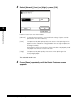
Press [Daylight Saving Time Settings] ➞ [On] ➞ [Start Date].
- Eastern time (US/Canada): GMT-5:00
- Central time (US/Canada): GMT-6:00
- Mountain time (US/Canada): GMT-7:00
- Pacific time (US/Canada): GMT-8:00