
imageCLASS MF7280 Reference Guide





Specifying Common Settings
3-39
3
Customizing Settings
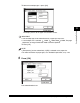
❑ Select the envelope type ➞ press [OK].
The display returns to the paper size selection screen.
IMPORTANT
•
If the envelope type is not selected correctly, a paper jam may occur.
•
If an envelope size is selected, 1 2-Sided, 2 2-Sided, Book 2-Sided, Two-page
Separation, or Image Combination mode cannot be specified.
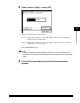
❑ Press [OK].
NOTE
•
[Transparency] can be selected only if [LTR] is selected as the paper size.
•
For more information on paper types, see "Available Paper Stock," on p. 2-43.
5
Press [OK].
The selected mode is set.