
imageCLASS MF7280 Reference Guide





Specifying Common Settings
3-38
3
Customizing Settings
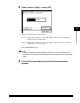
❑ Select the desired paper type ➞ press [OK].
IMPORTANT
•
When printing on special types of paper, such as heavyweight paper, be sure to
correctly set the paper type, especially if you are using heavyweight paper. If the
type of paper is not set correctly, it could adversely affect the quality of the image.
Moreover, the fixing unit may become dirty and require a service repair, or the
paper could jam.
•
If you select a nonstandard paper size, the Auto Zoom, finishing modes,
1 2-Sided, 2 2-Sided, Book 2-Sided, Two-page Separation, or Image
Combination mode cannot be specified.
NOTE
For more information on paper types, see "Available Paper Stock," on p. 2-43.
● If you want to select an envelope size:
❑
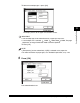
Press [Envelope].