
imageCLASS MF7280 Reference Guide





Specifying Common Settings
3-37
3
Customizing Settings
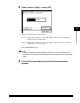
❑ Press [X] to specify the horizontal axis of the paper ➞ enter a value using the
numeric keys on the touch panel display.
❑ Press [Y] to specify the vertical axis of the paper ➞ enter a value using the
numeric keys on the touch panel display.
❑ Press [OK].
The display returns to the paper size selection screen.
NOTE
•
If you make a mistake when entering values, press [C] on the touch panel display
➞
enter the correct values.
•
You can enter only 2, 4, 8 or 16 as the denominator.
•
The value entered in inches is converted to millimeters by the machine each time it
is entered. Thus, there may be a slight difference between the value calculated and
the actual value entered.
•
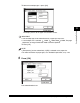
To enter values in millimeters, press [mm].
•
When entering the value in millimeters, you can also use - (numeric keys),
and (Clear) to clear your entry.
•
When entering the value in millimeters, you can also change the value by pressing
[-] or [+] in increments of 1.0 mm, even if you have entered the value.
•
If you enter a value outside the setting range, [OK] is grayed out and cannot be
selected. Enter an appropriate value.
•
You can use values for [X] between 5 7/8inch (148 mm) and 17inch (432 mm), and
for [Y] between 3 3/4" (95 mm) and 11 11/16" (297 mm).
❑ Press [Next]