Specifying Common Settings
3-35
3
Customizing Settings
3
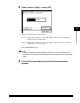
Press [On] ➞ [Store].
If you press [Off], proceed to step 6.
4
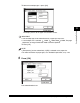
Select the desired paper size.
● If you want to select a standard paper size:
❑
Select the desired paper size ➞ press [Next].
NOTE
To select an A or B series paper size, press [A/B-size].