
imageCLASS MF7280 Reference Guide





Specifying Common Settings
3-32
3
Customizing Settings
Energy Consumption in the Sleep Mode
You can set the amount of energy that the machine consumes when it is in the
Sleep mode.
NOTE
•
In some cases, the energy consumption level in the Sleep mode is 'High' even when the
energy consumption level is set to 'Low', such as when:
- A job is being processed (including a report job or receive job).
- Any of the following settings are set from the Additional Functions screen:
•
The default setting is 'Low'.
1
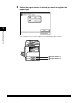
Press (Additional Functions) ➞ [Common Settings].
If necessary, see the screen shot in step 1 of "Initial Function at Power ON," on p.
3-15.
2
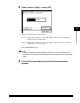
Press [▼] or [▲] until [Energy Consumption in Sleep Mode]
appears ➞ press [Energy Consumption in Sleep Mode].
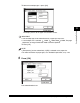
The DHCP setting is set to 'Off'.
(See Chapter 3, "Using a TCP/IP Network," in the Network Guide.)
The SMB setting is set to 'Off'.
(See Chapter 4, "Using a NetBIOS Network," in the Network Guide.)