
imageCLASS MF7280 Reference Guide




Specifying Common Settings
3-23
3
Customizing Settings
3
Press [Done] repeatedly until the Basic Features screen
appears.
Printer Density
You can set the density for printing.
NOTE
The default setting is '5'.
1
Press (Additional Functions) ➞ [Common Settings].
If necessary, see the screen shots in steps 1 of "Initial Function at Power ON," on
p. 3-15.
2
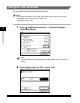
Press [▼] or [▲] until [Printer Density] appears ➞ press
[Printer Density].