
imageCLASS MF7280 Reference Guide




Additional Functions Settings Table
3-10
3
Customizing Settings
■ System Settings Table Continued
*1 Indicates the default setting.
*2 See the Facsimile Guide.
*3 See the Sending Guide.
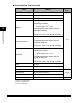
Item Settings
Applicable
Page
Forwarding Settings
*2, *3
Receive Type
All
*1
, Fax, I-Fax
Validate/Invalidate
On, Off
*1
Register
Condition Name: 50 characters maximum
Forwarding Conditions
Receive Type: Fax
*1
, I-Fax
Forwarding Destination: Select from the
registered addresses.
File Format: TIFF
*1
, PDF, Divide into Pages
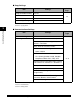
Forward w/o Cond.
Receive Type: Fax
*1
, I-Fax
Forwarding Destination: Select from the
registered addresses.
File Format: TIFF
*1
, PDF, Divide into Pages
Detail/Edit
Condition Name: 50 characters maximum
Forwarding Conditions
Receive Type: Fax
*1
, I-Fax
Forwarding Destination: Select from the
registered addresses.
File Format: TIFF
*1
, PDF, Divide into Pages
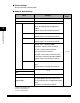
Erase Yes, No
Print List Yes, No
Device Info Settings
p. 5-28Device Name 32 characters maximum
Location 32 characters maximum
User ID Management
On, Off
*1
p. 5-30