
imageCLASS MF6540/MF6590/MF6595/MF6595CX Basic Operation Guide




Troubleshooting
11-6
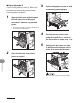
Paper Cassette 2
If you use the paper cassette 2*, follow this
procedure to remove the jammed paper
from the paper cassette 2*.
1 Open the left cover and then open
the left side cover of the paper
cassette 2*. Remove any jammed
paper.
* The paper cassette 2 is optional for MF6595
and standard for MF6595cx.
2 Close the left side cover of the
paper cassette 2*.
●
3 Pull out the paper cassette 2* and
remove any jammed paper.
4 Push the corners of the stack
under the small fins as shown in
the illustration in step 6 on p.
11-5.
5 Gently push the paper cassette
2* back into the machine until it
clicks, then close the left cover.
Be careful not to get your fingers caught.